


See how top teams approve artwork 30% faster
Book a 30-minute, tailored walkthrough of your real workflows to see how Filestage can support your team. Learn how leading teams get packaging and artwork signed off faster.

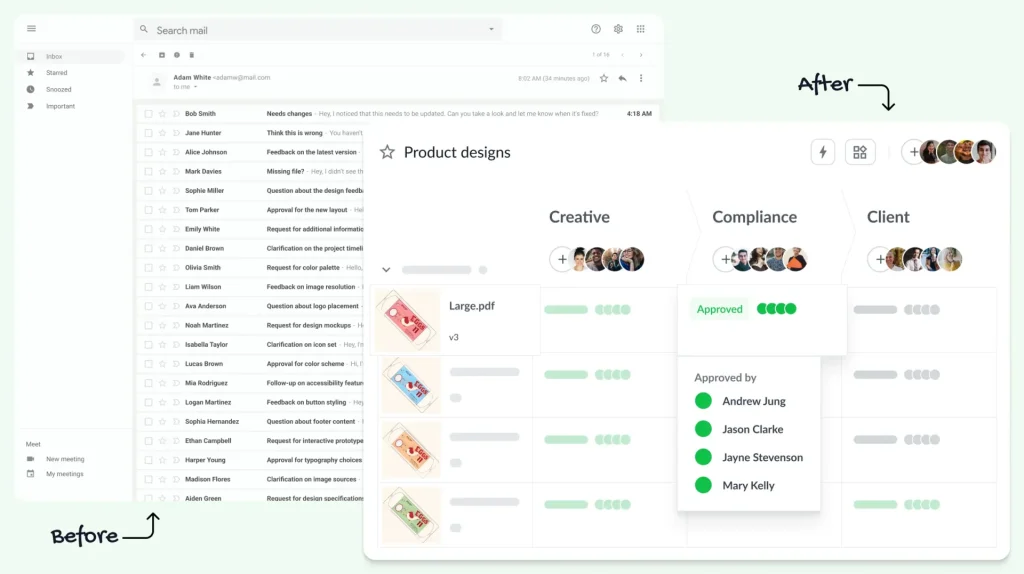






Why agencies need client proofing software
Collecting client feedback on creative work can quickly become chaotic – scattered feedback, conflicting comments, and missing context cause delays and frustration. Filestage brings all client feedback into one place so it’s structured, trackable, and easy to act on.

Simplify feedback
Clients comment directly on the file, pinned to the exact frame, page, or pixel – so nothing gets lost in an inbox.

Protect project margins
Structured review rounds cut through the usual chaos that stalls sign-offs. Get quality work out faster, send your invoice, and move onto the next brief.

Get a full audit trail
Clients approve with a single click, and every sign-off is logged in a documented, defensible record. This works for AI-assisted content too, so you can scale without second-guessing.
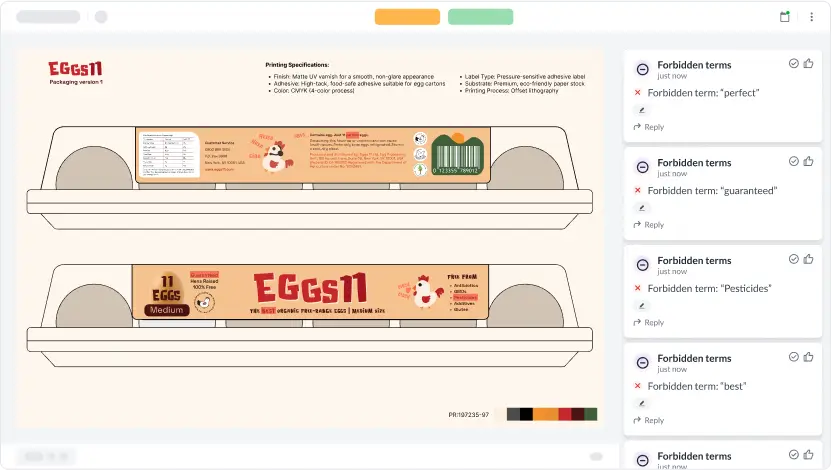
Fix mistakes instantly
Grammar Agent
Custom Prompt Agent
Mandatory Images Agent
Forbidden Terms Agent



How Filestage accelerates client feedback
Automated approval workflows
Internal collaboration
Full version control
Real-time visibility
Filestage is one of the only tools that lets our marketing team and agency partners collaborate in one platform. This makes sure everything goes through the necessary product managers and technical experts before it goes out the door.

Karina Berner
Creative Production Specialist at Sartorius

A big advantage of Filestage is that all reviewers can see the comments that were already left by other reviewers and avoid contradictory feedback.

Stephanie Isabelle Flaig
Head of Operations at Videoboost

Filestage is a must for marketing agencies. It allows everyone, from our team to our clients, to have all the information they need and know exactly where to find all versions. It keeps everything neat and accessible, so no one’s left scrambling for the right file.

Melissa Abrini
Creative Director at Story

The whole process is streamlined and we have a tracked record that shows our clients when they review the comments and the date that they approved it.

Mark Stern
CEO at Custom Box Agency

Book a 30-minute, tailored walkthrough of your real workflows to see how Filestage can support your team. Learn how leading teams get packaging and artwork signed off faster.


How Filestage works
Build a structured, four-step workflow that takes your creative work from first draft to client-approved:
Share designs, videos, documents, or websites for client review. Clients and freelancers can join instantly – no account needed.
Define who reviews what and when, with clear review steps so nothing reaches the client before it’s ready.
Clients leave comments directly on the file, making sure every piece of feedback is clear and actionable.
Track approvals in real time and lock in final versions with a complete audit trail.


Share designs, videos, documents, or websites for client review. Clients and freelancers can join instantly – no account needed.
Define who reviews what and when, with clear review steps so nothing reaches the client before it’s ready.
Clients leave comments directly on the file, making sure every piece of feedback is clear and actionable.
Track approvals in real time and lock in final versions with a complete audit trail.
Filestage is built to keep your clients’ content secure during the review process. Share files securely with password protection, download restrictions, and anonymized feedback. Filestage offers full GDPR compliance, AES 256 encryption that’s certified against ISO/IEC 27001:2022, and certified EU servers.


Automate your workflow with our native and custom Zapier integrations.
Assign review tasks to your teammates and track file statuses in your project management tool.

Share files, comments, and review decisions in your favorite channels and spaces.

Upload files and see comments in your content creation tools, so you can iterate and get approval faster.

Create custom integrations in Zapier, turn marketing request forms into projects, and more.

What is a client feedback tool?
A client feedback tool helps agencies collect, manage, and act on feedback from clients in one place. Instead of scattered comments across email and chat, feedback is left directly on creative assets — making reviews faster and approvals clearer.
What are the benefits of client feedback software for my agency?
The right client feedback tool allows you to see the status of all your client projects at a glance and keep track of where approval is needed. Consolidating all feedback in one dashboard makes it easier to collect client feedback (without the chaos of neverending email threads). As a result, you can speed up content reviews and reduce follow-up questions by having clients leave contextual feedback directly on creative assets.
What’s the difference between a client feedback tool and general project management software?
Client feedback tools are specifically designed for managing complex workflows with multiple stakeholders and a high volume of assets. Most agencies fit this description. For example, with Filestage, you can leave in-context feedback on assets, auto-compare content versions to confirm all changes are made, automate manual tasks to scale content production, and manage all assets and feedback in one place. By contrast, feedback still needs to be managed outside of a general project management tool. It’s also difficult to create custom workflows for complex review processes.
What types of files can I review with Filestage?
As well as images and PDFs, Filestage also supports videos, documents, live websites, interactive HTML, and audio files. So if you’re working on multimedia projects and integrated campaigns, you can review all your files and feedback in one place. You can find a full list of our supported file types here.
How can I protect content files during the review process?
One of the biggest risks for agencies is having creative work land in the wrong hands. This is hard to control when sharing files by email. To combat this, we offer security features to give you full control over the review process, including password protection and restricted downloads. These features give you and your clients the peace of mind that your creative work is kept confidential.
How long does it take to get set up with Filestage?
In most cases, we can have you up and running in less than a day. Our team will support you in building a custom workflow template for your projects so you can start reviewing files immediately. Once you upload your first project, you simply invite your clients as reviewers or send them the review link and they can begin leaving feedback.
Do clients need to create an account to leave feedback in Filestage?
No. Clients receive a review link and can leave comments and approve files directly without the friction of creating an account. This is one of the most common reasons agencies cite for high client adoption rates. You can optionally add password protection for sensitive campaigns, but the default experience is frictionless for reviewers.
Does Filestage use AI to speed up the review process?
Yes, Filestage’s Review Agents automatically check assets before they reach your client, flagging off-brand colours, missing logos, broken QR codes, and forbidden terms in seconds. For agencies producing high volumes of content, this removes a layer of manual checking that’s easy to miss under deadline pressure. Your team gets to focus on the work that actually needs human judgment.